Elegant Watercolor Wedding Invitation Templates in Sage Green
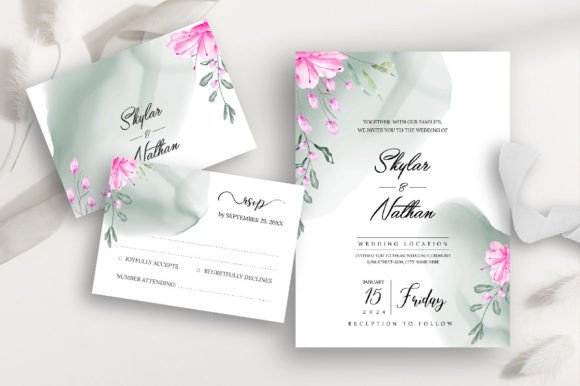
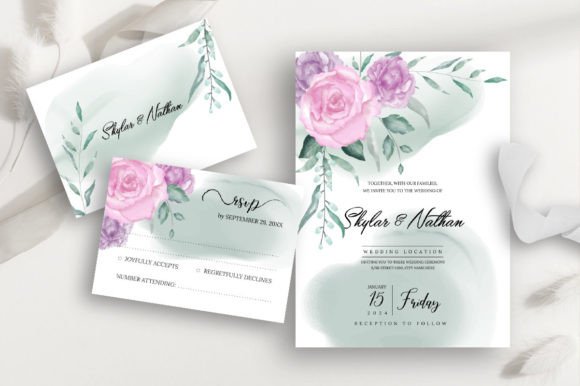
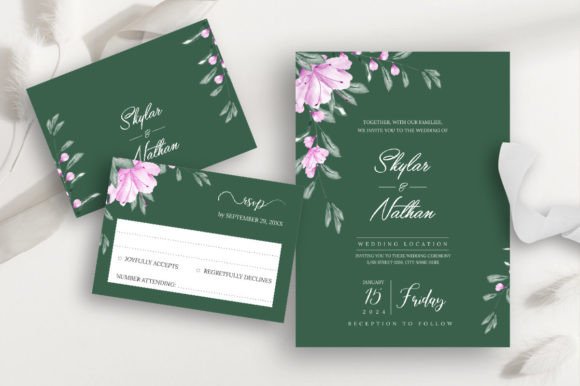
There's something undeniably calming about sage green. It's the color of new beginnings, of quiet mornings in a garden, of a love story that feels both timeless and fresh. When you're planning a wedding, capturing that specific feeling—the serene elegance of a dusty rose peony against a silvery green leaf—is a delicate art. That's precisely where these elegant wedding invitation templates come in, offering a beautiful starting point for couples who want their stationery to tell a visual story from the very first "save the date."
More Than Just an Invitation: A Foundation for Your Wedding's Visual Identity
Think of your wedding invitation as the opening chapter. It sets the tone, whispers a hint of the celebration to come, and gives guests their first tangible piece of your special day. The combination of soft, watercolor dusty rose with organic greenery leaves isn't just pretty; it's a powerful design choice. This palette communicates romance, nature, and a sophisticated simplicity that works for everything from a rustic barn wedding to an elegant garden party. The sage green provides a grounded, neutral base, while the blush tones add warmth and intimacy.
But the utility of these templates extends far beyond the wedding day itself. For the creative professional or savvy couple, they become versatile design assets. Imagine extracting the watercolor floral elements to create custom thank-you cards, table numbers, or even a subtle background for a wedding website. The included vector files (EPS and SVG) mean you can scale, edit, and recolor every single element without losing quality. This isn't just a printable; it's a full brand kit for your event.
Practical Design for Real-World Projects
Let's talk about what you're actually getting and how it fits into a practical workflow. The package includes both a 5"x7" main invitation and a 3.5"x5" RSVP card, both with bleed. That technical detail matters. Bleed is the extra margin of design that extends beyond the cut line, ensuring that when you send these to a professional printer, you won't end up with unattractive white edges. It's a small feature that makes a big difference in achieving a polished, professional result.
The file formats are chosen for maximum flexibility:
- EPS & SVG Files: These are your workhorses for editing. Open them in Adobe Illustrator, Affinity Designer, or even free vector editors like Inkscape. You can change text, adjust the layout, modify colors, or isolate the floral wreath for another project entirely.
- JPG & PNG Files: These are perfect for quick digital use. Send a high-resolution PNG to a local print shop, use a JPG for a digital mockup, or post it to social media for a sneak peek.
The use of a free font is a thoughtful touch. It means you can download the exact typeface used in the preview, ensuring what you see is what you get—and you won't be hit with unexpected font licensing costs later. For designers, this is a huge plus, allowing for seamless integration into client projects or your own branding work.
From Wedding Suite to Brand Suite: Expanding Your Creative Toolkit
A designer's mindset sees potential in components. The delicate leaf border from the invitation could be adapted into a repeating pattern for gift wrap or a subtle texture for a website header. The elegant script font paired with a clean serif for the details creates a classic, readable hierarchy—a fundamental principle in strong typography. Here’s how these elements can be repurposed:
- Social Media Graphics: Create cohesive Instagram stories, Pinterest pins, or Facebook event headers that maintain your wedding's aesthetic.
- Print Materials: Design matching menus, ceremony programs, and signage. The consistent use of the watercolor motifs and color scheme builds immediate visual recognition.
- Digital Products: For stationery designers or Etsy sellers, this template can be a starting point. Customize it significantly for different clients, creating a unique product line while maintaining an efficient workflow.
- Brand Identity for Wedding Professionals: If you're a wedding planner, photographer, or florist, using these elements in your own marketing materials shows clients you understand and can execute a specific, on-trend style.
The key is to think of the template not as a finished product, but as a curated collection of high-quality design assets. The watercolor textures, the botanical illustrations, and the typography pairing are all individual tools you can mix, match, and modify to serve your specific creative goal, whether that's a personal project or a commercial one.
Making It Your Own: Tips for Customization and Implementation
Downloading the files is just the first step. To truly make the design yours, consider these practical steps:
- Font Pairing Test: While the provided font is beautiful, test it with alternatives. Swap the script for a different handwritten font to change the mood, or replace the serif with a modern sans-serif for a cleaner look. Always check readability at the size it will be printed or viewed.
- Color Palette Adjustment: Love the layout but your wedding colors are different? The vector files allow you to easily change the sage green to a dusty blue or the rose to a lavender. This one adjustment can create a whole new suite.
- Simplify or Embellish: Is the design too busy for your taste? In your vector software, you can remove elements—perhaps use just the leaf wreath without the florals, or vice versa. Conversely, you could add additional botanical elements from other assets to make it more lush.
- Print-Ready Check: Before sending to print, double-check the resolution (300 DPI is standard for print) and ensure all text is within the safe zone, away from the trim line. The included bleed makes this process much safer.
Ultimately, the goal of a template like this is to provide a beautiful, professional foundation that saves you time and inspires creativity. It bridges the gap between a vague idea and a tangible, elegant piece of communication. By understanding the components you have—the editable vectors, the print-ready dimensions, and the cohesive aesthetic—you have everything you need to craft stationery that feels deeply personal and impeccably designed.